Upkee: House Task Management
Keeping a home organized sounds simple, until you're the one trying to remember everything.
Upkee helps people plan cleaning routines, manage recurring chores, share responsibilities, and keep their home on track.
I designed the product from scratch, focusing on making setup easier, reducing repetitive work, and helping people build routines they can actually stick to.
100+
Screens
20+
Core User

// Role and Timeline
Product designer
8 weeks (Q2, 2026)
// Team
Aayush, iOS developer
Piyush, Product manager
Anushka, Marketing
Anish, CEO
Dhruvil, Primary QA
// Responsibilities
Product Strategy
UX Research
Information Architecture
User Flows
UX/UI Design
Design System
Prototyping
Developer Handoff
// Tools
Figma, Design tool
Lottie Files, Micro animations
ChatGPT, UX Copy and image
Slack, Communication
Clickup, Sprint and progress
Project at a Glance
Upkee was designed from 0 → 1, covering the core experience from onboarding and home setup to tasks, AI, shared workspaces, and the final design system.
20+
User Flows
The Challenge
Managing a home comes with a lot of small things to remember.
Change the bedsheets.
Clean the bathroom.
Sweep the floor.
Water the plants.
None of these tasks are complicated. It's keeping track of all of them that's tiring.
Existing cleaning apps often make users do too much work upfront. Create rooms, add tasks, set schedules, invite people, and only then start using the app.
I wanted Upkee to feel different.
The product needed to help people get organized without making organization itself feel like another chore.
The Goal
I focused the product around four simple goals:
Research
Upkee was a new product, so I started by understanding the space first.
I studied competing cleaning and household task apps and went through App Store reviews to see where people were struggling.
Three patterns stood out:
01
Setup took too much effort.
Users had to create rooms and tasks before they could really use the app.
02
Creating chores felt repetitive.
Most tasks are predictable, but users still had to add them manually.
03
Collaboration could get confusing.
Once multiple people were involved, assigning and managing responsibilities became harder.
These became the problems I wanted to solve first.
Designing for Real Homes
Every home is different.
Upkee starts by asking what kind of place the user is setting up.
01
Home
For families and independent houses.
02
Apartment
For apartments and residential flats.
03
Office
For compact spaces and studios.
03
Shared Flat
For roommates and shared living.
UI showcase for home type selection

Spaces Before Tasks
Start with the places people actually live in.
Once the setup is chosen, users pick the spaces they want to manage.
Upkee recommends spaces such as:
01
Bedroom
12 recommended tasks
02
Bathroom
8 recommended tasks
03
Kitchen
4 recommended tasks
03
Living Room
3 recommended tasks
Users can also create custom spaces when their home doesn't fit the presets.
UI showcase for home type selection

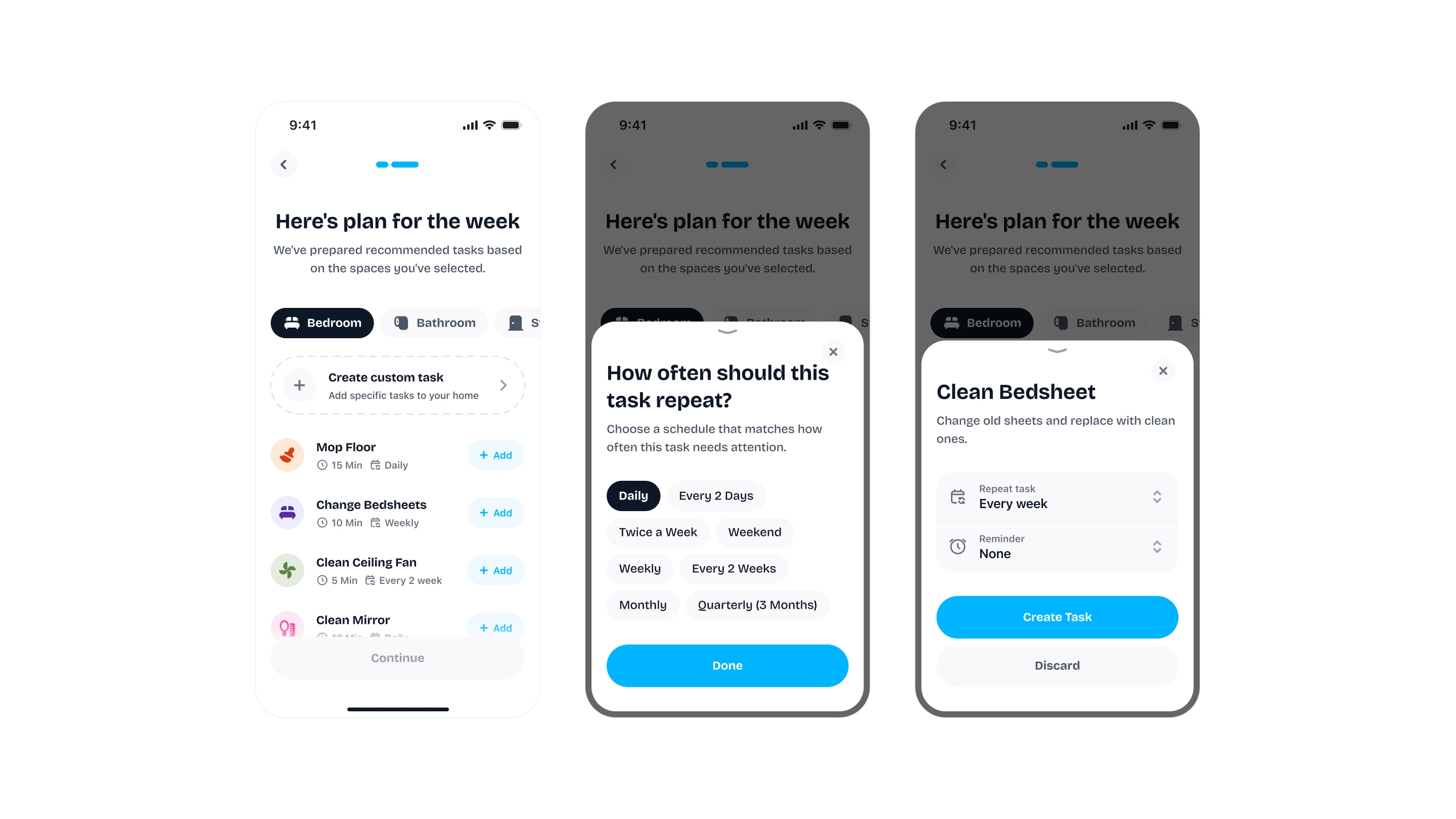
A Plan, Not an Empty Screen
Give users something useful right away.
Once spaces are selected, Upkee prepares a starting cleaning plan.
For example:
Users can add the suggested tasks or create their own.
The idea was simple: don't make users figure everything out before they can start.
UI showcase for home type selection
The Home Screen
Open the app and know what needs attention.
Once setup is complete, Home becomes the daily starting point.
Users can quickly see:
The screen adapts to the user's current state instead of always showing the same dashboard.
UI showcase for home type selection
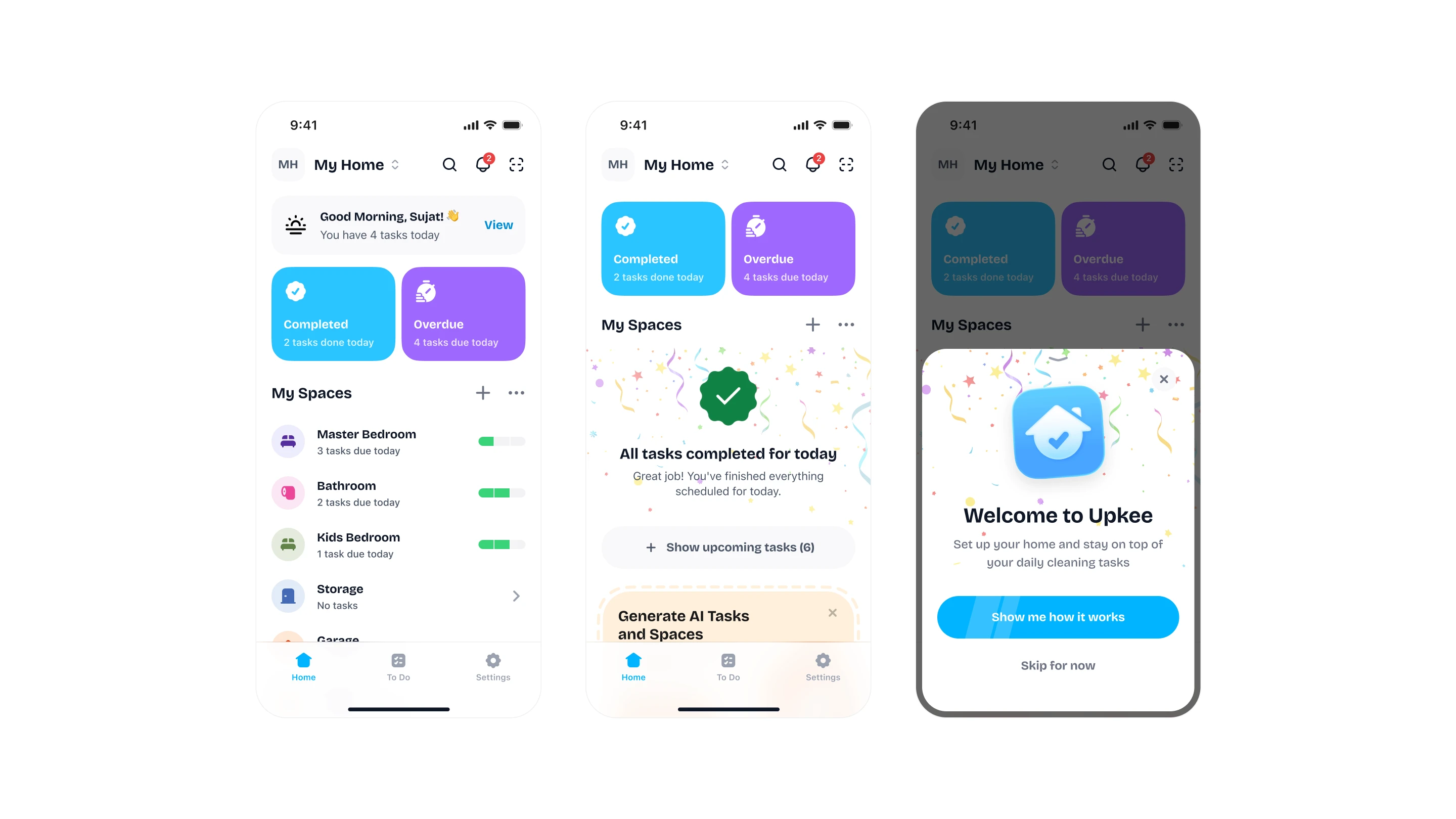
Not every day needs the same message.
If tasks are waiting:
4 tasks due today & 2 overdue.
If everything is finished:
All tasks completed for today.
If there's nothing planned:
No tasks due today!
Each state gives users a clear next step instead of leaving them with a generic empty screen.
Spaces Become the Daily Workspace
A room shouldn't just hold tasks. It should show what's happening there.
Inside a space, users can see:
Today's tasks
Upcoming tasks
Overdue tasks
Completion progress
Activity history
For Example
Master Bedroom
Today · 0 of 3 Done
The live product similarly positions workspaces and rooms as the place where cleaning tasks are kept and managed.
For example:

I kept the motivation simple.
Upkee doesn't rely on points, badges, or leaderboards.
Instead, progress shows users how their routine is going.
A space can show:
8 completed this month. 1 skipped, 2 overdue, 87% completion rate
The idea was to make progress visible without turning household chores into a competition.
Shared Homes
Keeping a home running is usually a team effort.
Upkee supports shared workspaces so people can divide responsibilities instead of keeping everything in one person's head.
Members can join through:
Shared links
QR codes
Join requests
New members can start with limited access while owners stay in control.
The App Store listing also highlights shared chores, member invitations, QR joining, and member permissions as core product capabilities.
For example:

Permissions
Not everyone needs the same access.
Some people need to manage the whole home.
Others just need to complete their tasks.
Upkee supports:
Owners can change permissions or remove members when needed.
For example:

Notifications
Reminders should help, not become noise.
Upkee keeps people updated when something actually needs attention.
That includes:
• Assigned tasks • Completed tasks • Mentions • Overdue tasks • Workspace requests • Other activity
The goal is to keep everyone in sync without making the app feel noisy.
For example:

Calendar
See what's coming next.
Recurring chores don't always happen today.
The calendar gives users a broader view of their routine, helping them look ahead and understand what's coming up.
The live product also highlights upcoming and completed cleaning activities through its calendar experience.
For example:

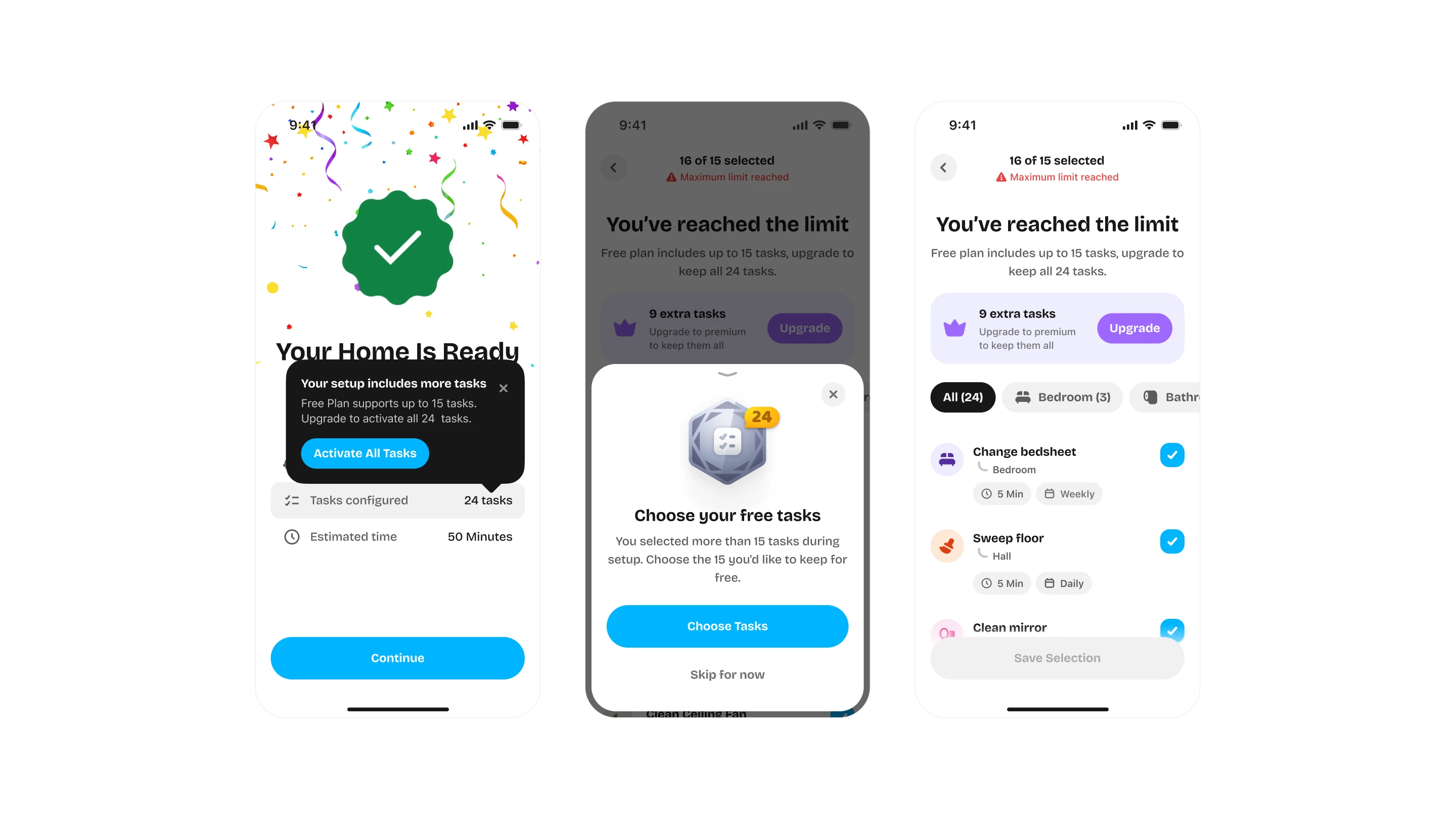
Handling Limits Clearly
No surprises when users reach the limit.
When someone reaches the free task limit, the product explains what happened instead of simply blocking the action.
Free task limit reached*
Upgrade to Premium to create more tasks.
The upgrade appears in context, when the user already understands why they need more capacity.
For example:
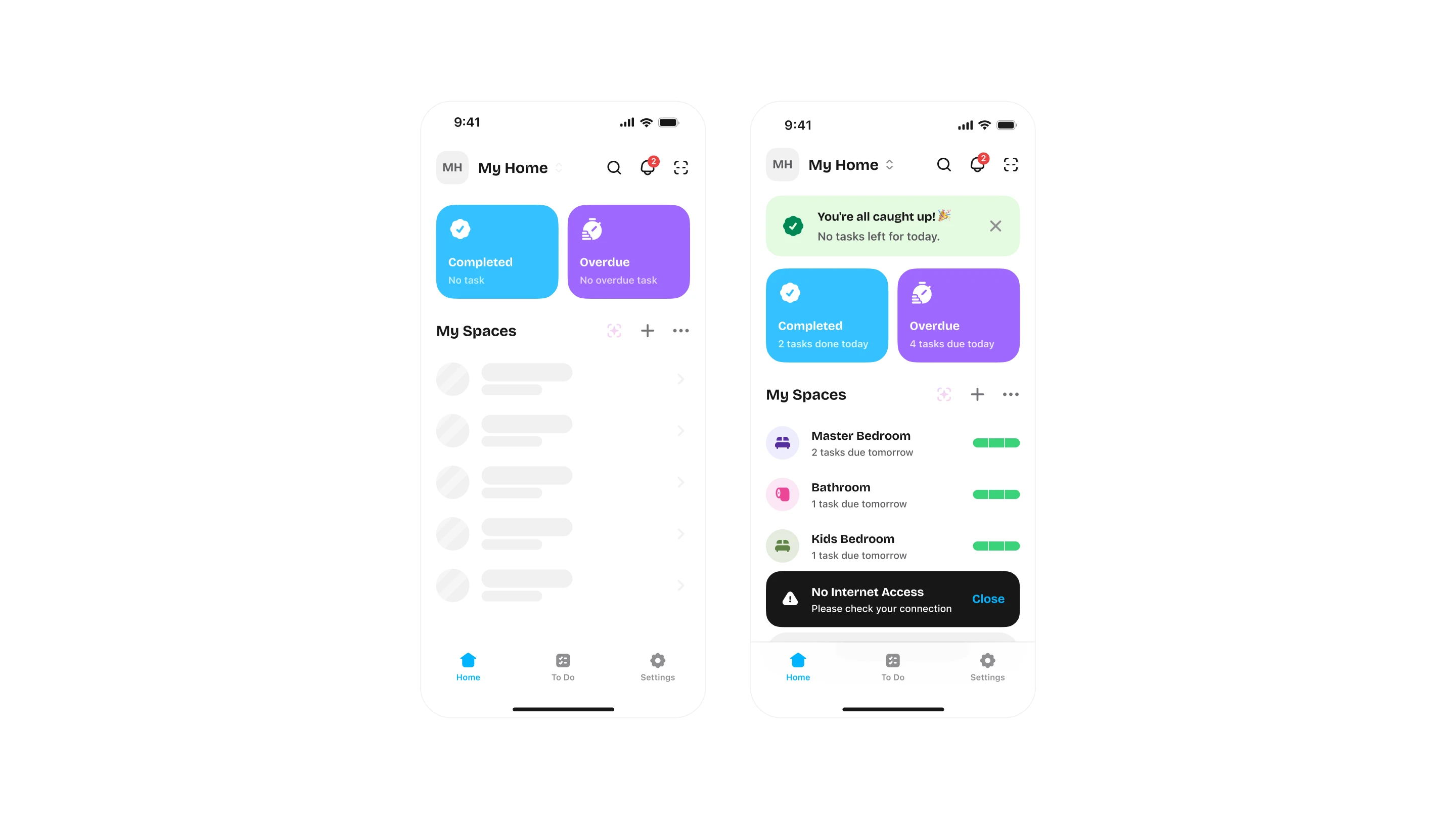
Offline
Your home shouldn't stop working because the internet does.
Individual users can continue managing their existing tasks offline.
AI-powered features need an internet connection, so those actions remain network-dependent.
This keeps everyday task management usable even when connectivity isn't available.
For example:
Designing the Edge Cases
The happy path is only part of the product.
I also designed states for:
No spaces
No tasks
No completed tasks
Overdue tasks
No internet
Pending workspace approval
Declined join request
Permission changes
Premium limits
Camera permission
Gallery permission
AI image limits
Account deletion
These states help the product feel complete when things don't go as planned.
For example:

Design System
A small system built to scale.
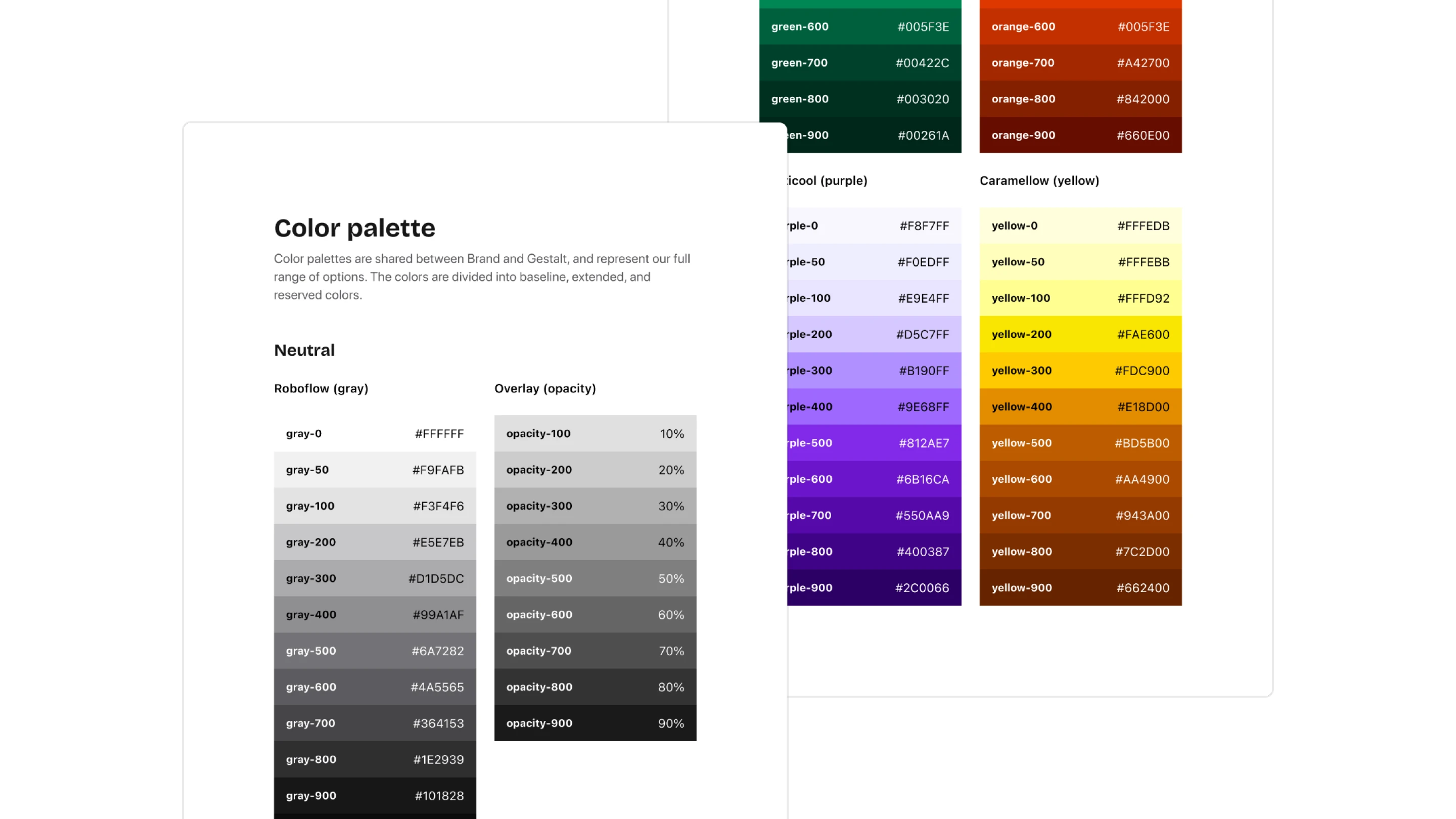
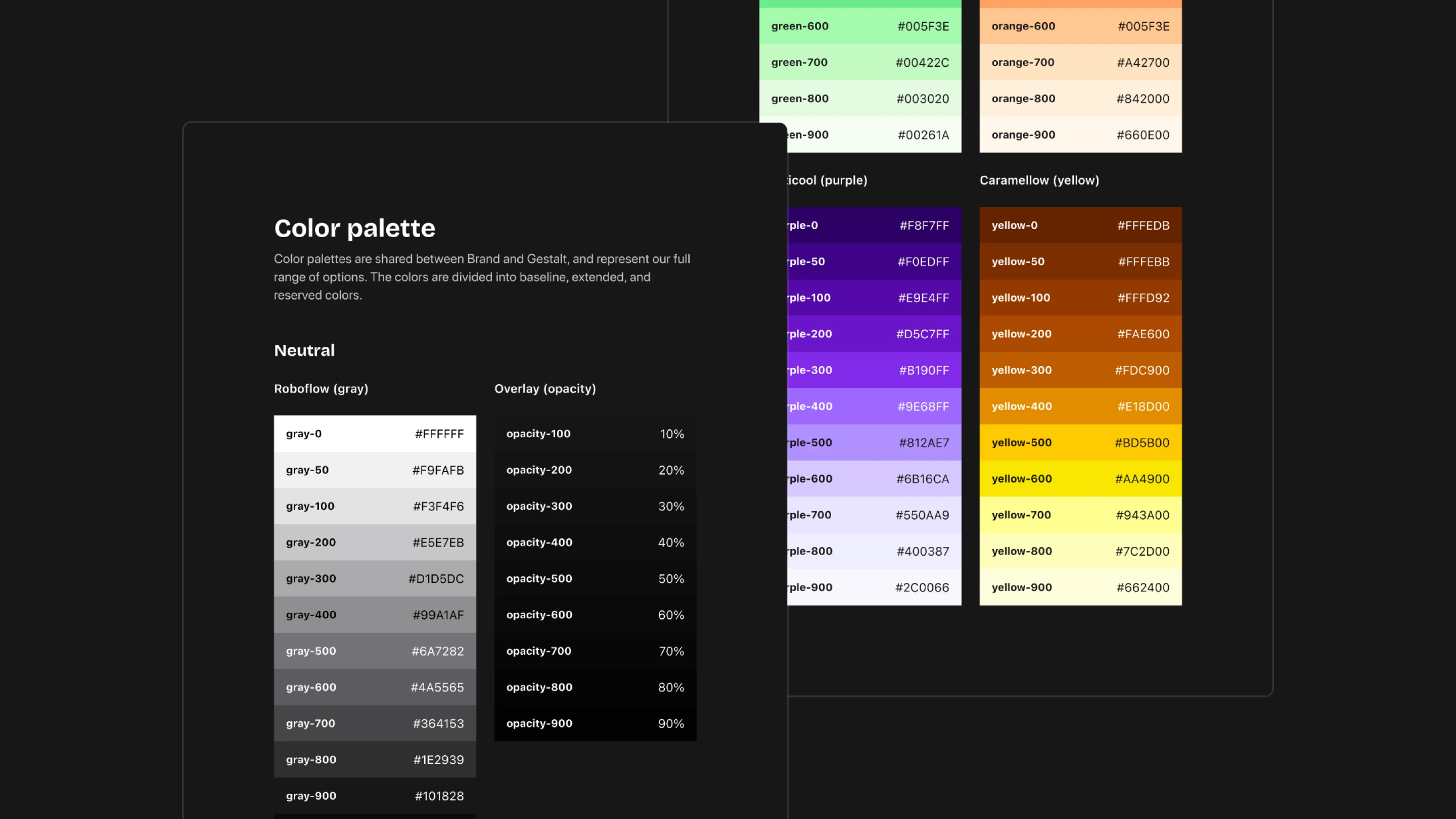
With 50+ screens and 20+ user flows, consistency needed to be part of the process from the beginning.
I created a lightweight design system covering:
Colors
Typography
Spacing
Components
Icons
It gave the product a consistent visual language and made it easier to keep new screens aligned as the experience grew.
For example:


From 0 → 1 to a Live Product
What started as a new product idea went through research, onboarding iterations, task systems, AI-assisted setup, shared workspaces, recurring routines, Premium, and a full design system before becoming a live product.
The biggest lesson for me was that the product didn't need to make cleaning exciting.
It needed to make the work around cleaning easier.
Preset spaces instead of starting from zero.
Recommended tasks instead of typing everything.
AI instead of repetitive setup.
Shared responsibilities instead of guessing.
Recurring schedules instead of remembering.
That's what I wanted Upkee to do.