AI Chat Assistant
A multimodal AI platform that combines conversations, image generation, voice interactions, custom assistants, and multiple AI models into a single experience.
400K+
Downloads
4.2
3K Ratings

// Role and Timeline
Product designer
4 weeks (Q1, 2026)
// Responsibilities
Competitor research
MVP and USP ideation
UX strategy
Mini design system
Product design
Usability and user testing
// Team
Sahil, Android developer
Bhagyashri, Product manager
Anushka, Marketing
// Tools
Figma, Design tool
Adobe Illustrator, Graphic works
Lottie Files, Micro animations
ChatGPT, UX Copy and image
Problem Statement
When I joined the project, the product was primarily a chat-based AI assistant. While it solved basic conversational needs, users increasingly expected AI tools to do much more—generate images, search the web, analyze content, and support different workflows.
At the same time, switching between multiple AI apps created unnecessary friction, while the existing onboarding experience prevented many users from even reaching the product. The challenge was to evolve the platform without making it more complex.
Goal
Transform a chat-first AI app into a unified AI platform where users could chat, generate images, explore multiple AI models, create custom assistants, and access powerful AI capabilities from a single experience.
The redesign focused on improving first-time user activation, reducing friction, increasing feature discovery, and supporting long-term product growth.
Research & Insights
To understand where users struggled, I analyzed product analytics, onboarding funnels, competitor experiences, Play Store reviews, and internal product feedback. A few clear patterns emerged.
Users wanted immediate value
People installed the app to solve a problem—not to complete multiple onboarding screens. Long introductions created unnecessary friction before users experienced the product.
AI expectations had changed
Users no longer expected AI to only answer questions. They wanted image generation, web search, specialized assistants, and multiple AI models in one place.
Too many choices created confusion
As more AI models became available, users found it difficult to understand which model was best for different tasks. Clear guidance became as important as the models themselves.
Feature discovery was limited
Powerful capabilities existed, but many users never found them because they were buried within the interface. Improving discoverability became a key design priority.
Simplicity drives engagement
Analytics showed that reducing unnecessary steps helped more users reach the core product experience. The onboarding redesign reduced user drop-off from 40% to 18%, reinforcing that faster access leads to better engagement.
Designing For Growth
When I took ownership of the Android experience, the product was primarily a chat-based AI assistant. As AI capabilities evolved, users expected more than simple conversations.
The challenge wasn't adding more features—it was introducing new capabilities while keeping the experience simple and approachable.
As user expectations evolved, the platform needed to support:
Before
After
Closing Statement
The goal wasn't to build another AI chatbot.
It was to create a unified AI experience where users could chat, create, research, and solve problems without switching between multiple tools.
Information Architecture
Organized everything around one chat screen so users can move between tools without getting lost.
Cross-Platform Value
Users can finish more tasks in one place without switching apps, saving time and reducing effort.
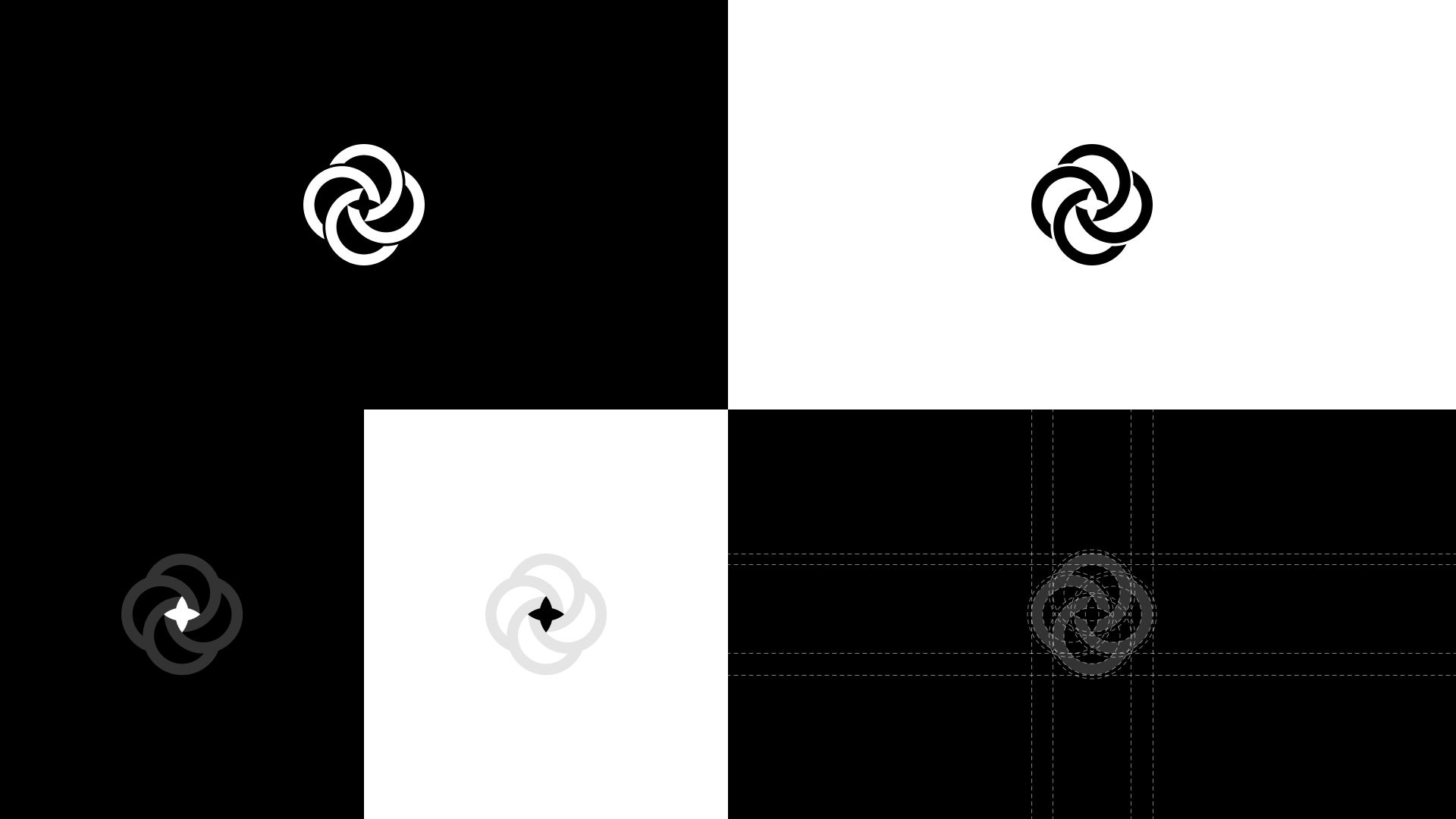
Logo psychology
The logo is designed to represent the core intelligence and interconnected nature of an AI assistant.
Thought behind app icon
01
Connected Intelligence
Multiple AI tools seamlessly united into one powerful platform.
02
Continuous Learning
AI that continuously evolves and improves over time.
03
Human + AI Collaboration
Technology designed to work alongside people effectively.
04
Trust & Reliability
Stable, secure, and dependable assistance for everyday tasks.
05
Infinite Possibilities
Unlock creativity, productivity, and discovery without limits.
Simplifying Onboarding
The previous onboarding flow asked users multiple qualification questions before they could experience the product.
Examples included:
Is this your first time using AI?
Have you ever paid for AI tools?
Multiple feature introduction screens
Research and analytics showed that users were dropping before reaching the product experience.
User Insight:
Users don't install an AI app to answer questions. They install it to see if the app can solve their problem.
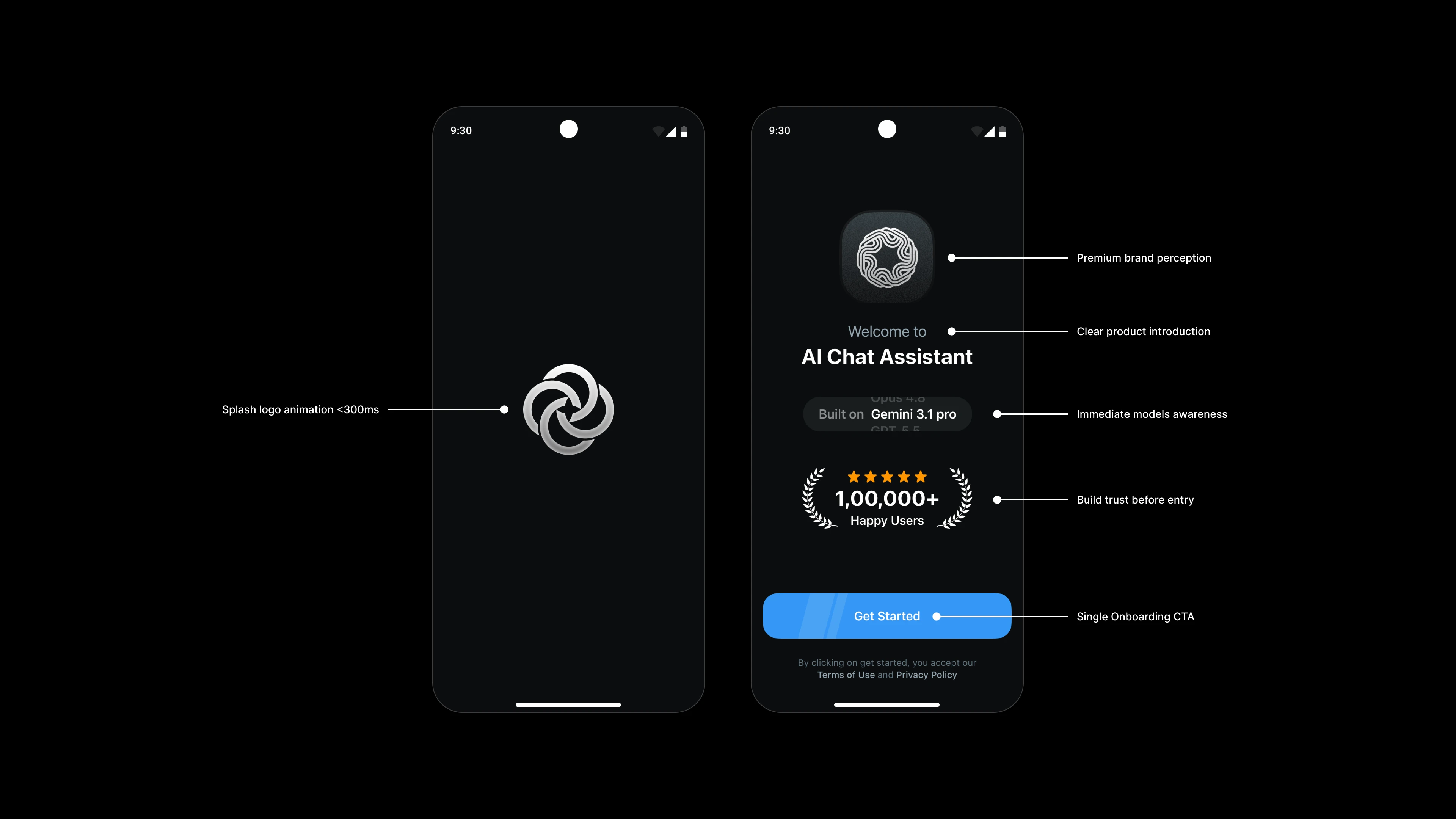
The Solution
Replaced the multi-step onboarding flow with a single-screen onboarding experience focused on getting users into the product faster.
40% → 18%
Drop-off Reduction
Simplifying onboarding helped more users reach the product experience faster.
+36.7%
More Users Completed Onboarding
A simplified onboarding flow helped more users successfully enter and experience the product.
The Challenge
Users frequently switch between different AI tools for conversations, image generation, voice interactions, and document analysis. This fragmented workflow increases friction, interrupts context, and reduces productivity.
UX Insight:
Why do I need four different apps to complete one task?
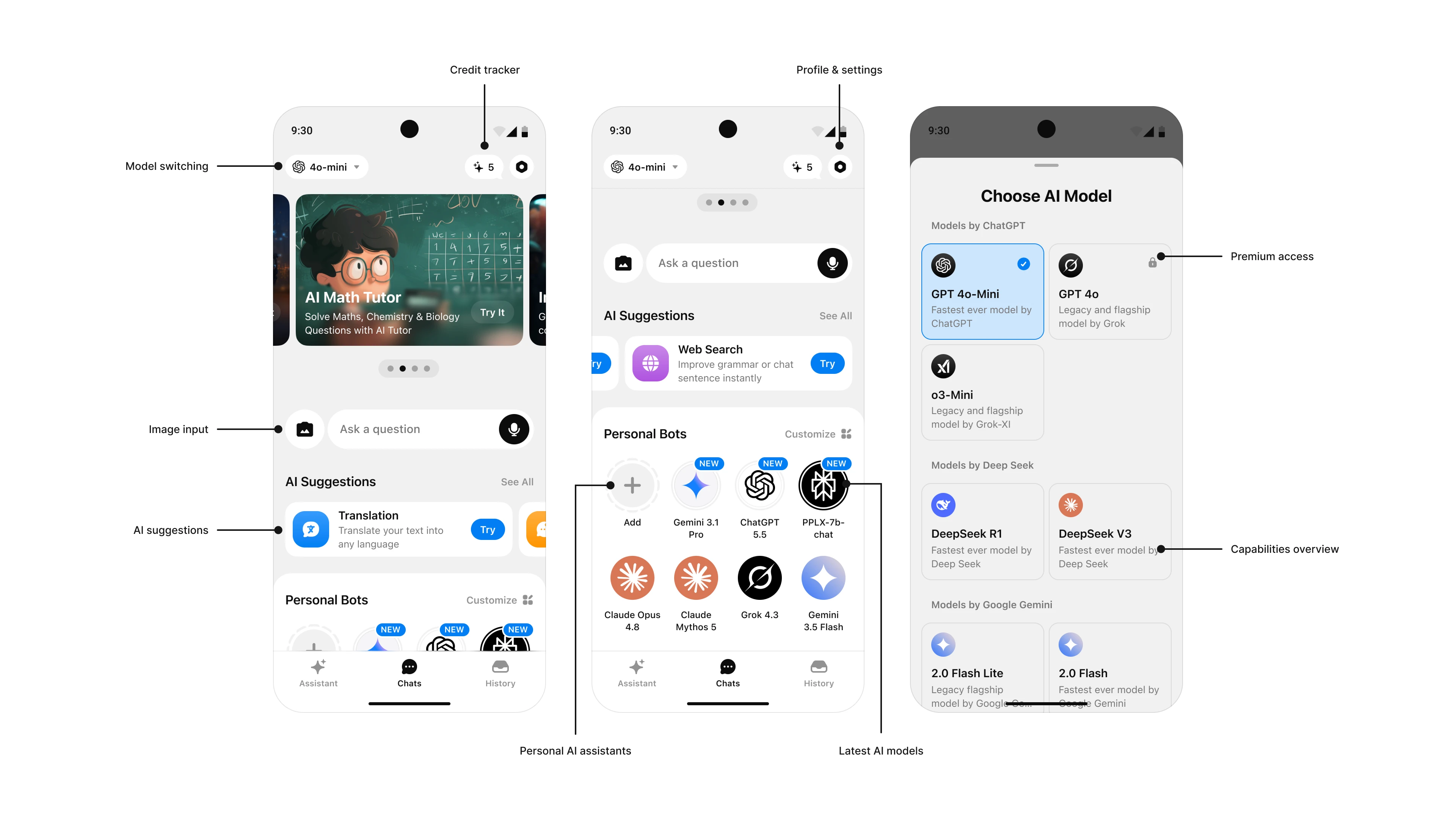
The Solution
Designed a unified AI platform that brings conversations, image generation, voice interactions, custom assistants, and multiple AI models into a single streamlined experience.
01
Model Flexibility
Switch between leading AI models based on your needs.
02
Custom AI Assistants
Create personalized assistants for specific workflows.
03
Multimodal Experience
Interact through text, voice, and images seamlessly.
04
Intelligent Discovery
Compare capabilities and choose the right model faster.
05
Productivity First
Access powerful AI tools from a single workspace.
AI Image Generation
Generate high-quality visuals from simple text prompts without leaving the conversation.
UX Goal:
Turn ideas into images in seconds.
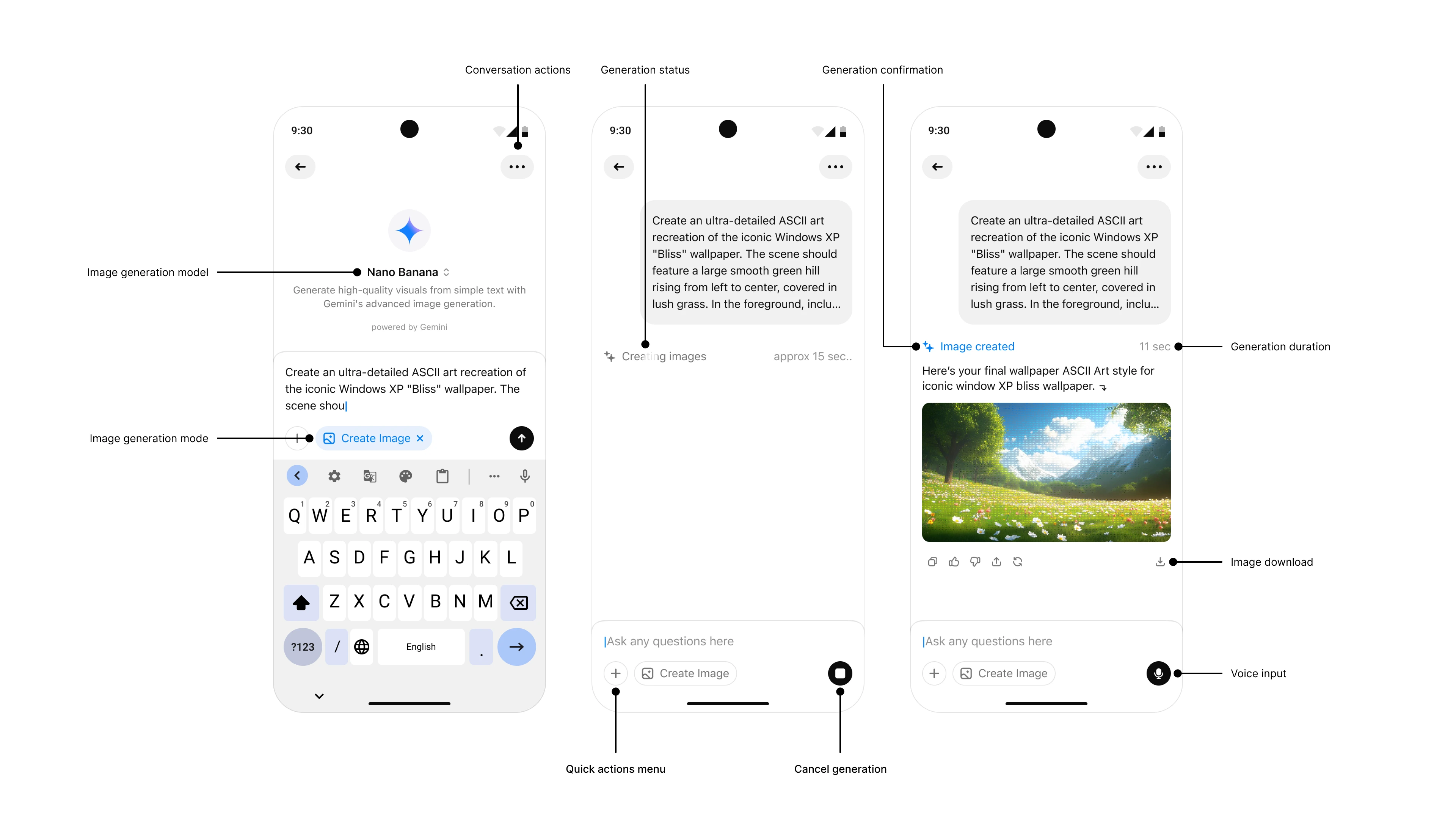
01
Simple Prompting
Turn ideas into images using natural language.
02
Live Progress
Track image generation in real time.
03
Instant Preview
Review results directly in the chat.
04
Quick Refinement
Improve and regenerate images effortlessly.
05
Productivity First
Access powerful AI tools from a single workspace.
Impact and Metrics
The redesign transformed the product from a chat-only AI assistant into a unified AI platform with image generation, multiple AI models, custom assistants, and productivity tools. Alongside improving the user experience, the redesign contributed to stronger engagement, premium adoption, and product growth.
40% → 18%
Onboarding Drop-off
Simplifying onboarding helped significantly more users reach the product experience and reduced early abandonment.
3.8%
Premium Conversion
Clearer value communication and a richer AI experience encouraged more users to upgrade to Premium.
12.3K
Monthly Active Users
Thousands of users actively rely on the platform each month for conversations, image generation, and AI-powered workflows.
1.8K – 2.2K
Daily Active Users
Consistent daily engagement reflects the product's value in users' everyday productivity.
18.5%
Play Store Preview Conversion
A strong store conversion rate demonstrates that the product positioning and messaging resonate with new users.
$0.41
ARPU
A healthy ARPU reflects successful monetization while balancing user value and premium adoption.
Big Picture Impact
The redesign evolved the product from a basic AI chatbot into a multimodal AI platform. By reducing onboarding friction and introducing AI models, image generation, custom assistants, and productivity features, users could discover value faster while the business benefited from stronger engagement and monetization.
Primary Metrics
40% → 18% Onboarding Drop-off
3.8% Premium Conversion
$0.41 ARPU
434K+ Downloads
Secondary Metrics
18.5% Play Store Conversion
4.2★ Rating (3.29K Reviews)
12.3K Monthly Active Users
1.8K–2.2K Daily Active Users
What i learned
Designing AI products isn't about adding more capabilities—it's about making powerful technology feel simple and approachable.
This project reinforced that users don't care which AI model they're using. They care about solving problems quickly, discovering the right tools effortlessly, and experiencing value from the very first interaction.
Outcome
Everything users need is now available in one place.
UX Impact:
One assistant. Multiple AI capabilities.
Final outcome & app experience
Style Guide
Established typography, colors, spacing and reusable components to ensure consistency and support future product scaling.


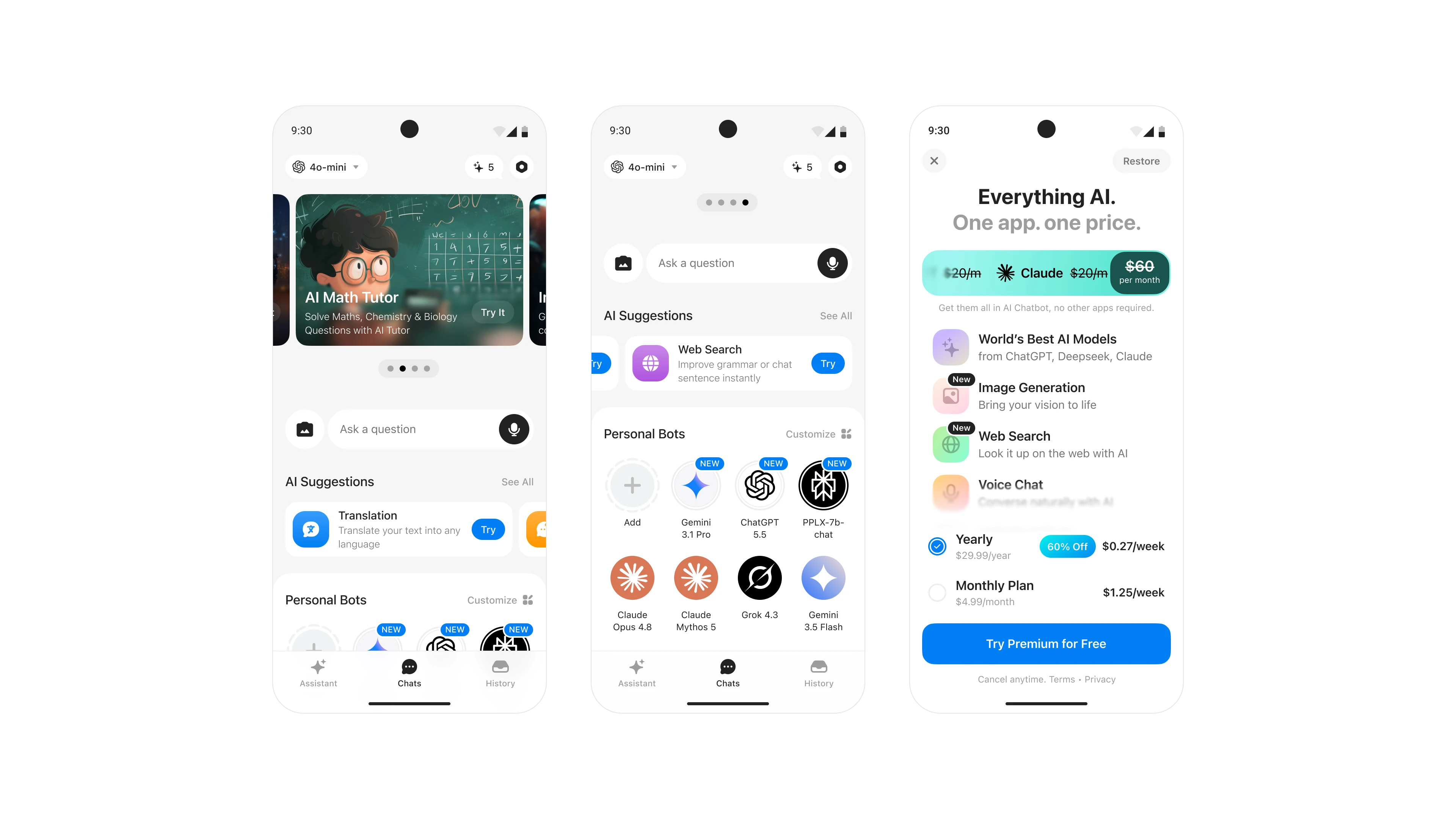
AI home experience
The redesigned home screen introduces AI suggestions, personal assistants, and premium benefits in one place, helping users discover features and start conversations faster.
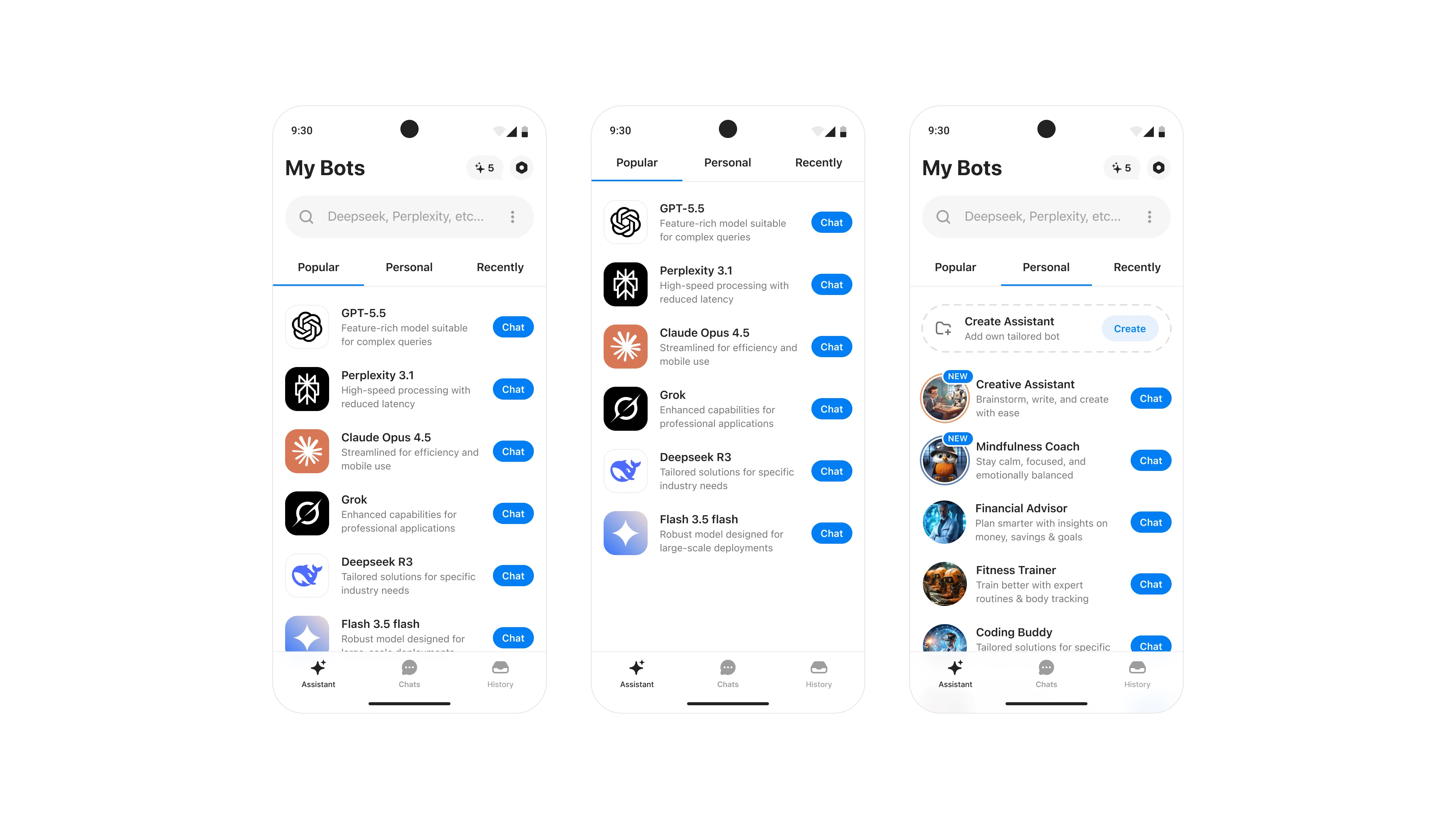
AI assistant library
Created a library of specialized AI assistants for different use cases, allowing users to start with optimized prompts instead of writing detailed instructions every time.
UX takeaway:
Reduce cognitive load by starting users closer to their goal.
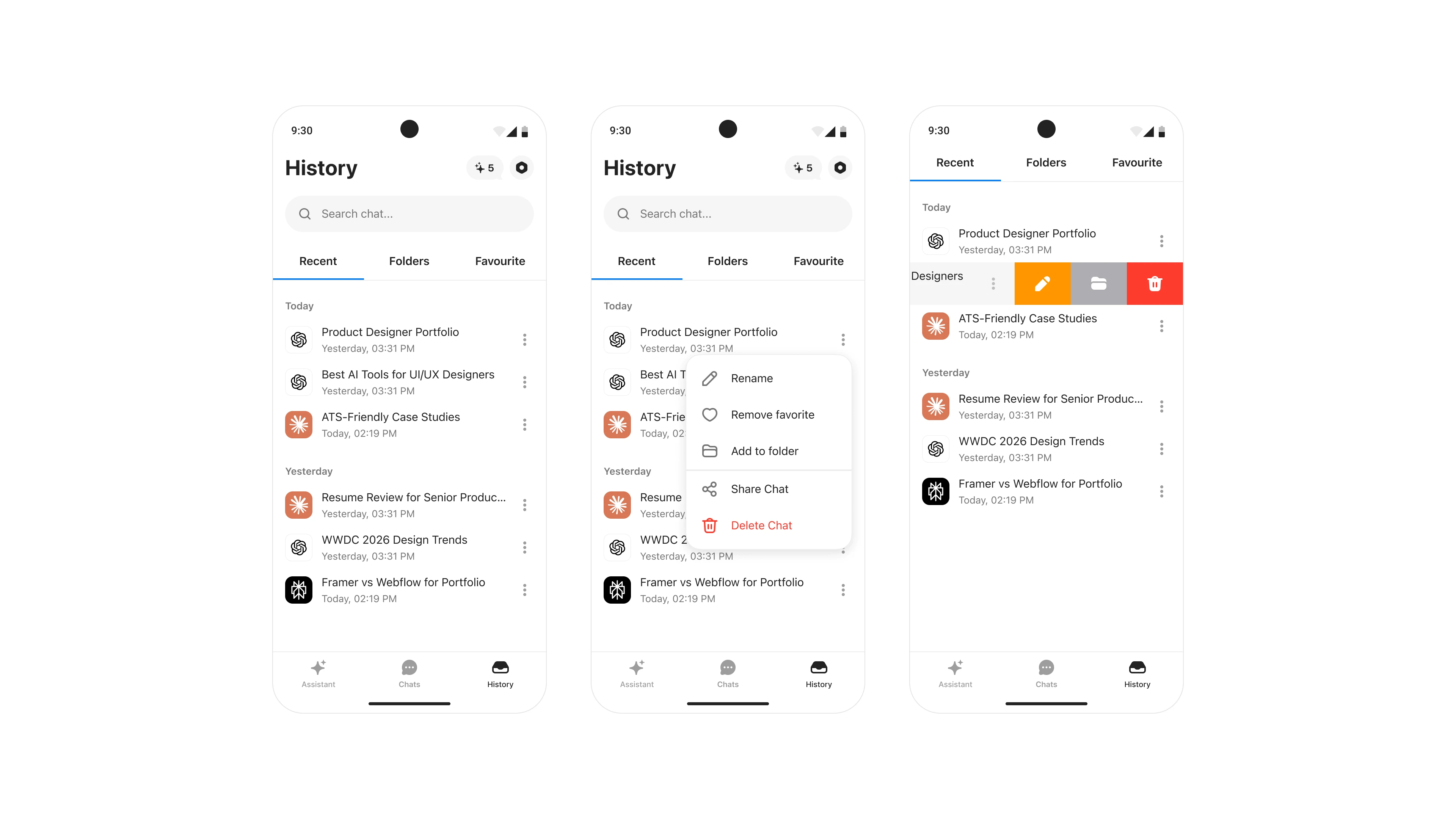
Chat History
Chat history with search, folders, favorites, and conversation actions, making previous chats easier to find and manage.
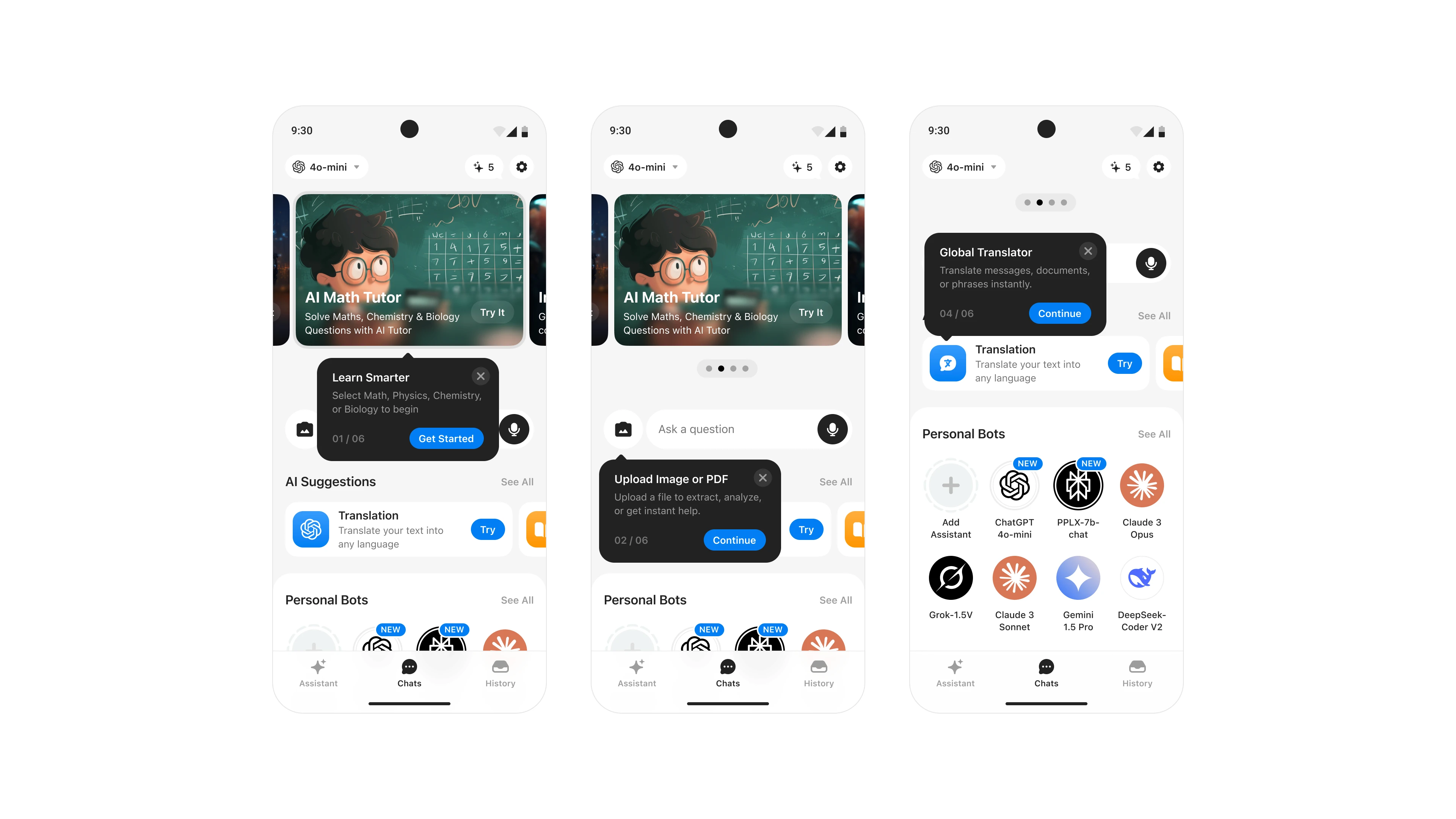
Interactive tooltips
Tooltips introduce features at the right moment instead of overwhelming users during onboarding. This progressive disclosure approach helps users discover capabilities naturally as they explore the product.
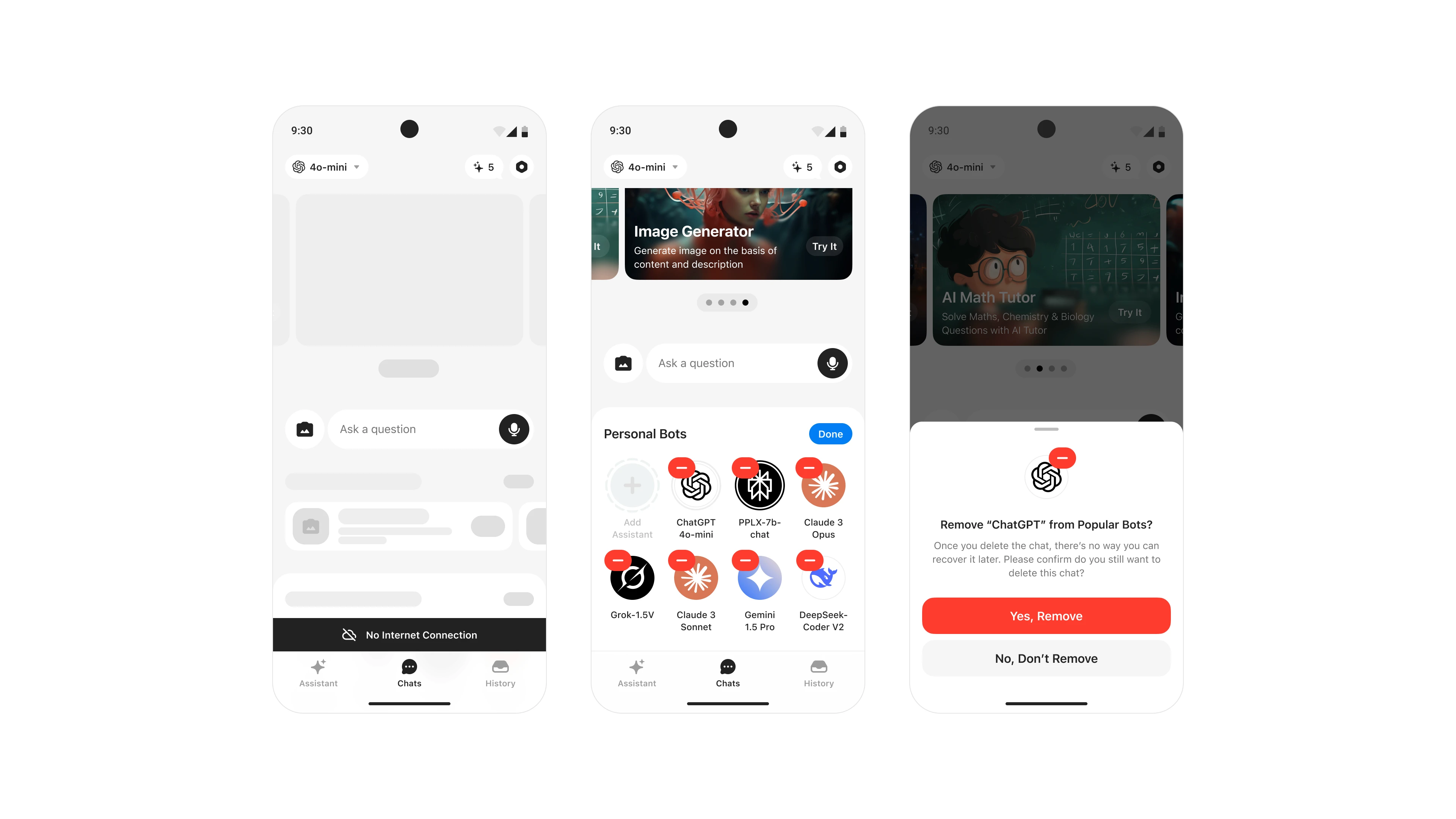
Offline & Personalization
The experience gracefully handles offline states while allowing users to personalize their workspace by organizing, adding, or removing AI assistants based on their needs.
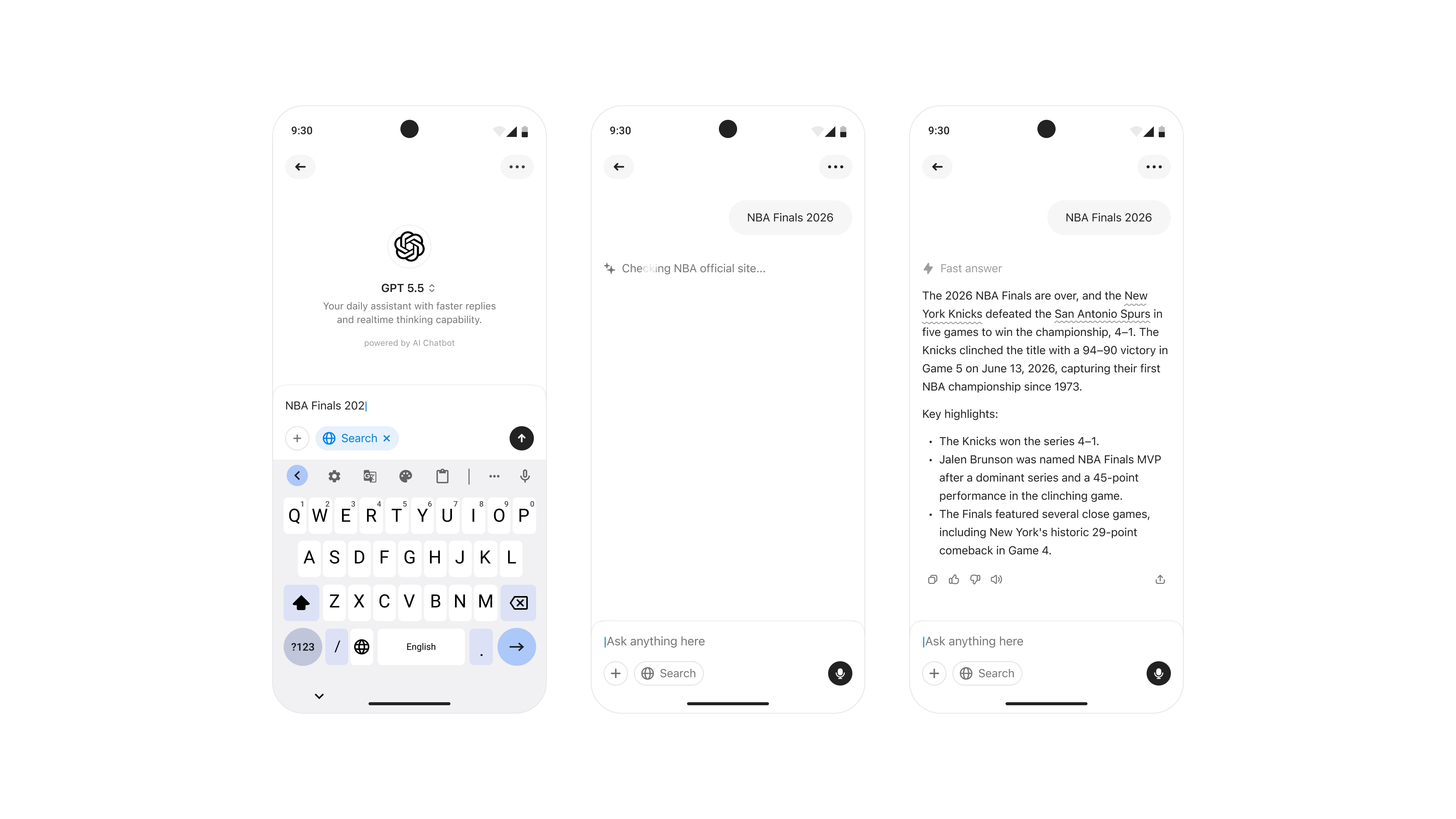
Conversation experience
The conversation interface supports text, voice, images, web search, and AI reasoning within a single workflow, allowing users to complete complex tasks without switching contexts.
UX takeaway:
Keep users in one flow—every context switch adds friction.
Reading experience
Added voice playback, adjustable text size, and quick response actions to improve accessibility and make long AI responses easier to consume.

Contextual actions
Used bottom sheets for contextual actions such as model selection, media upload, and premium upgrades, reducing navigation while keeping users focused on their current task.

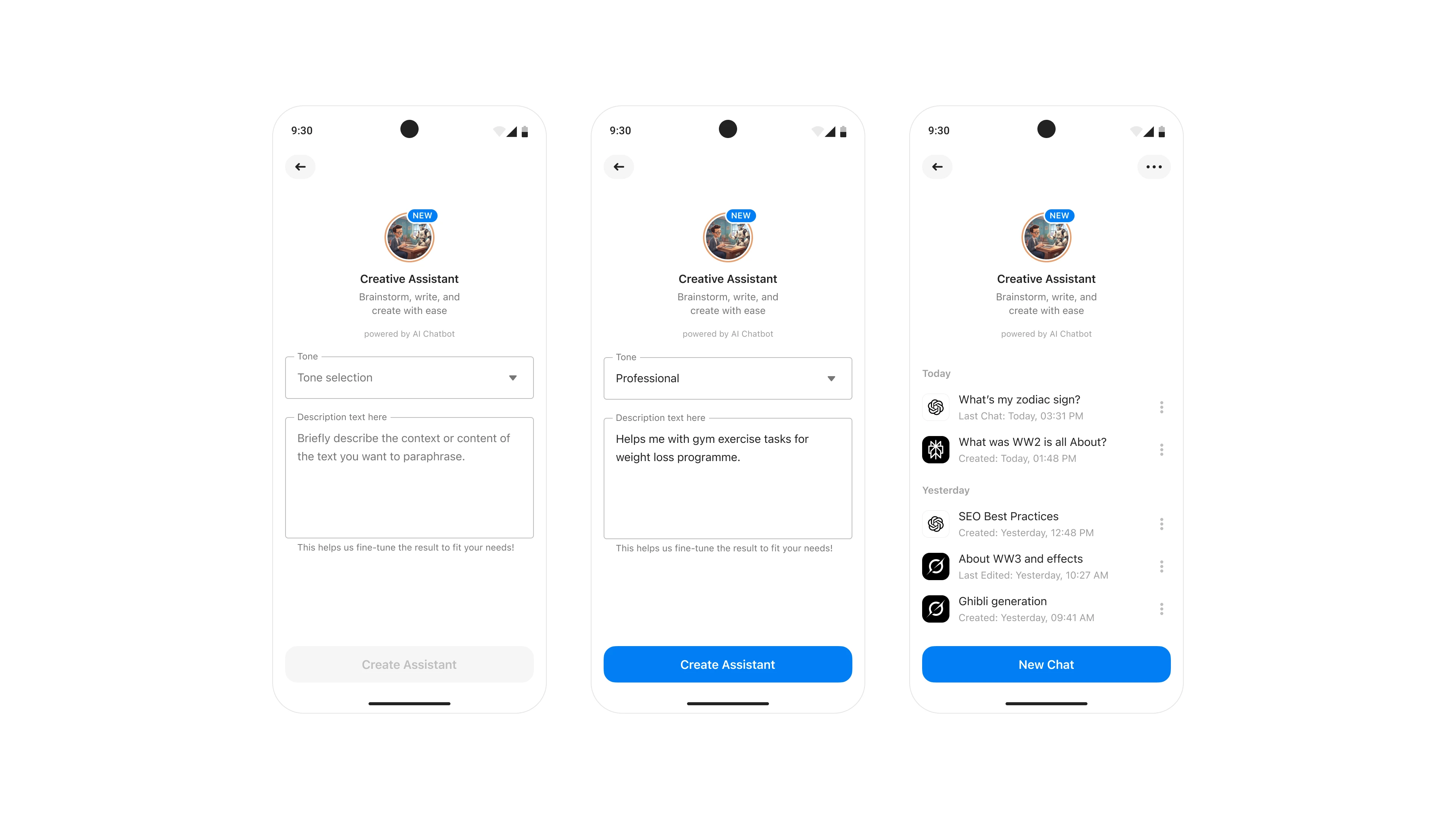
Custom assistants
Users can create personalized assistants by defining tone, behavior, and context, enabling consistent responses tailored to individual workflows.
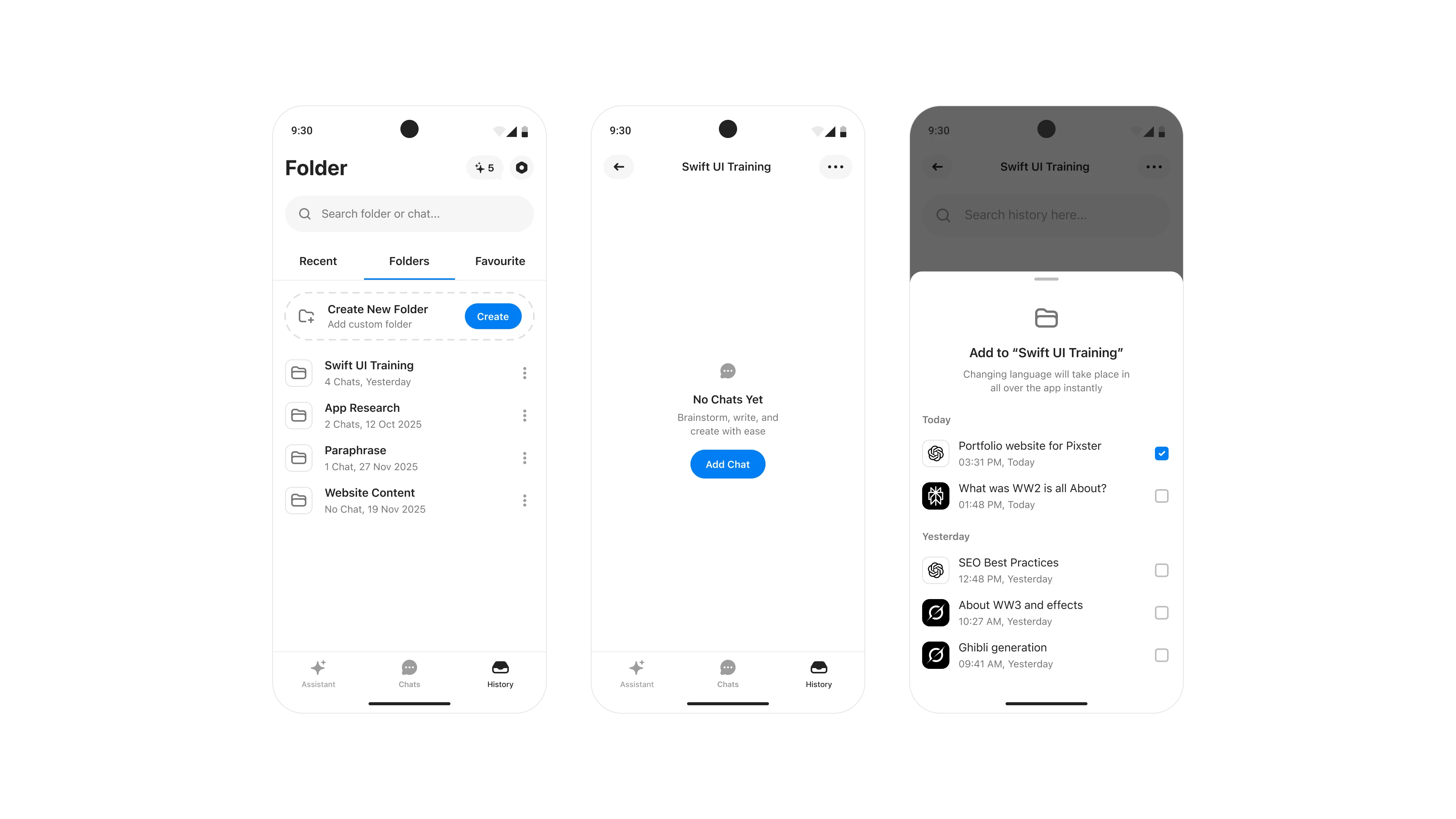
Chat folders
Folders help users organize conversations by projects, making long-term chat history easier to manage and reducing the effort required to revisit previous work.
UX takeaway:
Retrieval is just as important as creation.
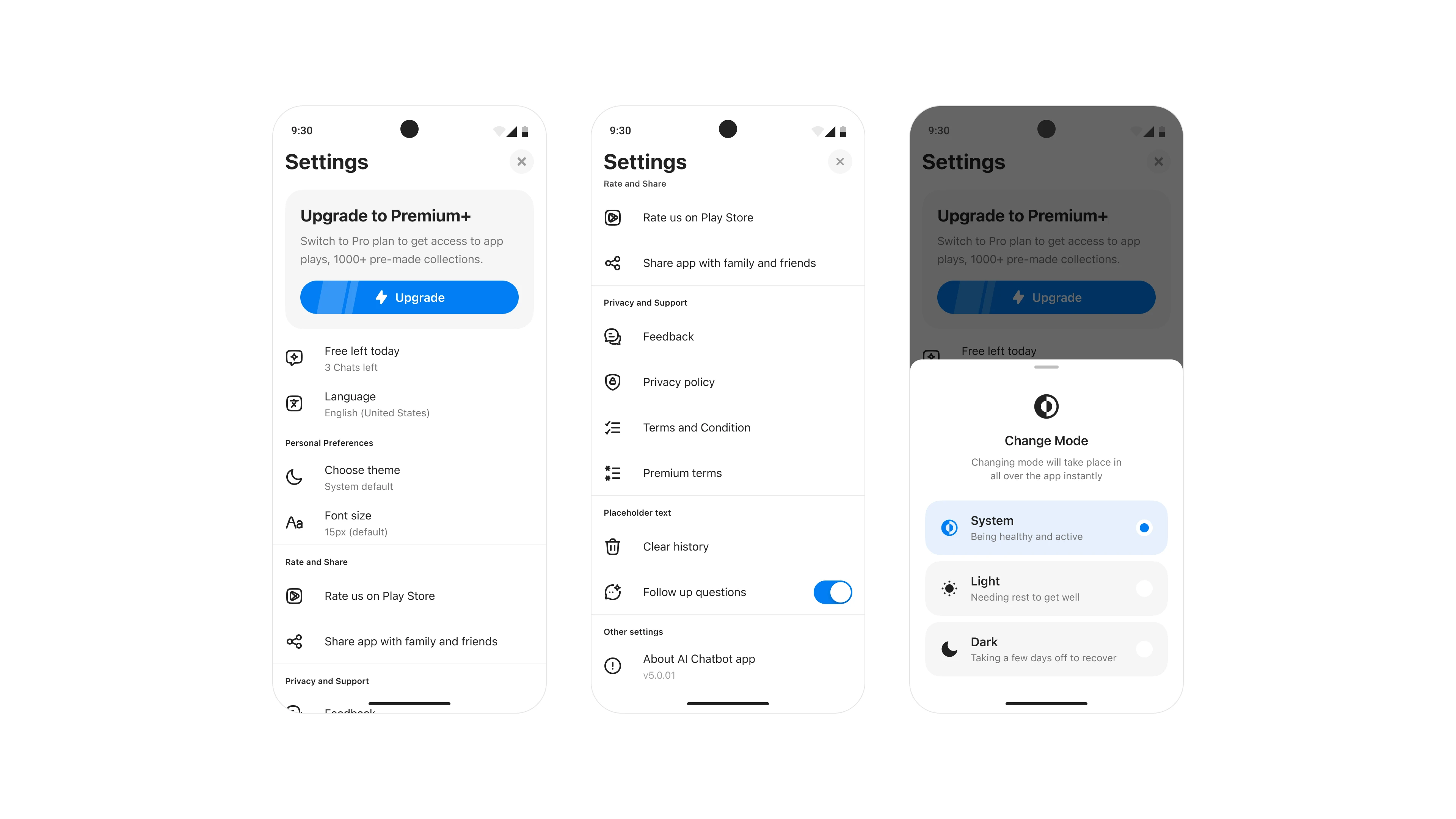
Personalization & Settings
Centralized appearance, language, accessibility, subscriptions, and app preferences into one place, giving users greater control over how they interact with the product.